

If you’re a midsize retailer evaluating options to become data driven, here’s the quick answer: you don’t have to decide between Retlia and Power BI, you need both! Retlia is built specifically to organize and pull insights from retail data, while Power BI is a general-purpose BI tool, which an be used with Retlia. Retlia offers pre-built retail dashboards, KPIs, and a 360° customer view, in both Power BI and Tableau. While using Power BI without Retlia may provide flexibility for broader use cases outside of retail, it requires more setup and technical expertise, and will have limitations.
Key Takeaways:
- Retlia: Retail-focused, turnkey solution with pre-built schemas, dashboards, and retail KPIs, for Power BI or Tablueau. Pricing starts at $58,900 or $3,000/month.
- Power BI: General-purpose, highly customizable BI tool. While seemingly affordable at $14/user/month (Pro) or $24/user/month (Premium), it requires specialized data engineering to setup, and if not used with a data warehouse, may cost hours to days of additional effort for every report on an ongoing basis.
Quick Comparison:
| Feature | Retlia | Power BI |
|---|---|---|
| Purpose | Retail-specific analytics | General-purpose BI |
| Ease of Use | Pre-configured, minimal setup | Requires setup and technical skills |
| Retail KPIs | Built-in | Custom setup needed |
| Customer Profiles | 360° view with household matching | General segmentation tools |
| Pricing | $60K setup or $3K/month | $14–$24/user/month, plus specialized services or FTE |
| Deployment | Cloud-based (Snowflake, Tableau, PowerBI) | Azure-based |
Bottom Line: Choose Retlia if you want a ready-to-go retail solution. Opt to go at Power BI alone if you already have extensive technical resources, especially a data architect.
| Get Your Midmarket Retail Data Warehouse and Power BI |
|---|
| Install and all data engineering included |
| Contact Retlia To Get Started |
Retlia: Data Warehouse Built for Midsize Retailers In Power BI
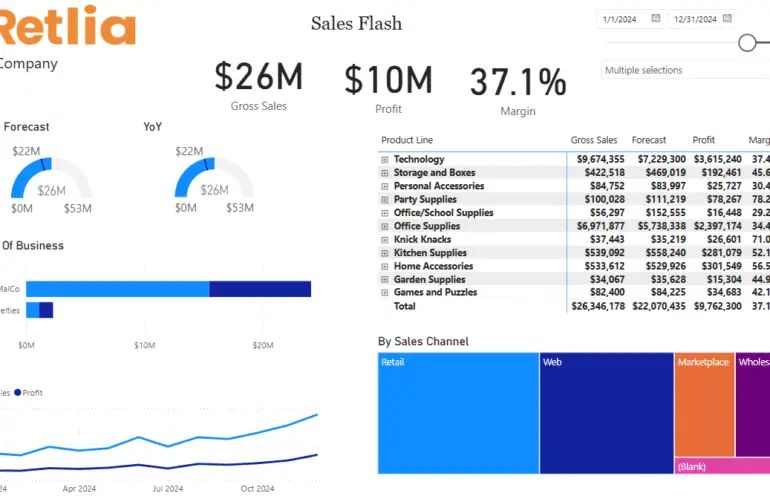
Retlia stands apart from general business intelligence (BI) tools by offering a ready-to-go data warehouse solution tailored specifically for midsize retail, ecommerce, and wholesale businesses. Instead of requiring you to start from scratch, Retlia provides a fully built analytics infrastructure designed to meet the unique demands of retail.
What Retlia Offers
At its core, Retlia is powered by a retail-specific data schema that organizes your data to align with retail priorities. It gathers and refines information from your key retail systems, then cleans and matches customer records across all sources for a unified view.
One standout feature is its 360° customer profiles, which address a common pain point in retail. With 71% of consumers expecting personalized service and 76% feeling let down when it’s missing [1], Retlia creates detailed customer views that include purchase history, product preferences, shopping channels, and buying frequency. It even performs household-level matching, recognizing when family members shop through different accounts or channels.
Retlia also empowers non-technical users with self-service analytics. Merchandisers, marketers, and store managers can use its drag-and-drop interface to create custom dashboards and reports. For even greater ease, the AI chatbot addon enables natural language queries like, “What were the top-performing products in the Northeast last quarter?”
The platform comes with pre-built retail KPIs to help you immediately identify trends. For example, it highlights your "Top 10" and "Biggest Losers" by SKU, category, or region, enabling faster decision-making. Additionally, it links sales data to specific marketing campaigns – whether email, paid media, or promotions – helping you pinpoint which customer segments respond best to different offers and fine-tune your marketing spend.
On top of its robust analytics capabilities, Retlia is designed to handle the specific needs of US retail businesses with ease.
US Business Format Support
Retlia is optimized for US retail operations. The platform integrates seamlessly with leading US retail tools like Shopify, WooCommerce, Square, NetSuite, QuickBooks, Salesforce, and Mailchimp. It also connects with major US payment processors and pulls data from Amazon Seller Central for businesses selling on the marketplace.
Pricing starts at $58,900 for a 60-day setup. Alternatively, businesses can opt for a subscription model at approximately $3,000 per month on a three-year contract. This package includes Snowflake and Tableau licenses, 100 hours of data engineering, and 10 hours of monthly support.
Retlia’s approach is particularly valuable for midsize retailers. With 32% of businesses lacking a unified data strategy and 42% struggling with the resources to build one [2], Retlia’s turnkey solution offers enterprise-level capabilities without the complexity. And the payoff is clear: businesses that manage their data effectively are 23 times more likely to excel in customer acquisition [2]. For retailers aiming to compete at a higher level, Retlia provides the tools to make it happen.
Power BI: General Business Intelligence Platform
Power BI is Microsoft’s leading business intelligence tool, designed to serve companies across a wide range of industries. With its broad capabilities in data analytics, Power BI offers tools that can be tailored to meet various business needs. Impressively, over 95% of Fortune 500 companies rely on Power BI, demonstrating its widespread use and appeal [7].
The problem comes when directly using its integrations with Microsoft’s ecosystem and other platforms like Salesforce, Google Analytics, and Facebook [6]. Power BI severely lacks the tools to clean, curate, organize, and unify data from multiple sources. For example, trying to replicate Retlia’s 360 customer profile directly in Power BI, you will quickly hit performance issues and fall short of the tools needed to run matching and merging algorithms. This is why Power BI is at its most powerful when fed from a data warehouse where the processing is done.
How Power BI Limits Your Data Analytics
Power BI Main Features
Power BI is built with self-service analytics in mind, empowering users to connect to data and create reports without heavy reliance on IT teams [3], attempting to allow business users to focus on insights that matter most to them. While this approach to “democratize data” (as we say at Retlia) is a worthy goal, Power BI’s performance limitations, and expecting business users to clean and merge data, quickly results in a data rat’s nest of disjointed, repetitive data sets all telling a different story about your most important business KPIs!
However, once hooked to clean data, Power BI does have some useful tools for self-service. A particularly useful feature is its natural language querying. Users can ask straightforward questions like, "What were sales last month?" and instantly receive visualized answers. The platform is also smart enough to understand relationships between fields, whether the data involves calculations, aggregations, or even geographical details [3].
Another major strength is real-time reporting. Power BI can automatically refresh dashboards and reports to reflect the latest data, with refresh intervals as short as one minute for users with the right licenses [4]. For example, Delta Air Lines uses Power BI to monitor customer service performance, tracking metrics such as average resolution times and customer satisfaction scores [8].
Visualization is another area where Power BI shines. It offers a wide range of visual options, from basic charts to highly customized graphics, all through an intuitive interface [3]. Major companies like Walmart and Unilever have leveraged these capabilities – Walmart uses Power BI to manage inventory and optimize supply chains, while Unilever analyzes marketing campaign performance across various channels [8].
However, Power BI’s general-purpose design means it often requires additional customization for industry-specific needs. For example, it doesn’t come with pre-built retail schemas or key performance indicators, and it assumes that data has already been cleaned, as it lacks built-in data cleaning tools [9].
Costs for Power BI Alone
As of April 2025, Power BI Pro is priced at $14 per user per month, while Power BI Premium costs $24 per user per month. The Pro plan supports datasets up to 1 GB and allows up to eight data refreshes per day. Premium, on the other hand, offers storage starting at 100 TB and allows up to 48 refreshes per day [9][10].
Power BI’s role in making data accessible company-wide is often emphasized by businesses, especially those large enough to have data engineers and architects, or small enough to have very simple data sets. David Zakkam, VP of Analytics at Swiggy, shared:
"Power BI is the chosen medium for our data democratization initiatives. Our dashboards are accessed hundreds of thousands of times every month by thousands of our employees" [5].
Similarly, Austin Bristow, Senior Manager of Business Intelligence at Fairlife, remarked:
"We like to think of it as data democratization across the company, to give people access to data in a single place, as that single source of the truth so many people are shooting for these days" [5].
While Power BI offers many advantages, its complexity can be a challenge for midsize retailers without dedicated IT support. Features like the Power BI Gateway, Power Query, and advanced tools such as DAX querying often require technical expertise, which may necessitate additional training or specialized staff [9][10].
Side-by-Side Feature Comparison
Let’s take a closer look at how Retlia and Power BI handle essential retail functions. Retlia focuses on retail-specific needs with pre-built connectors and dashboards, while Power BI offers a broader range of integrations suitable for general business use.
Feature Comparison Table
| Feature | Retlia | Power BI |
|---|---|---|
| Data Integration | Pre-built retail connectors for ERP, POS, ecommerce, and Amazon; includes 100 hours of data engineering setup | Extensive connector library for a wide variety of data sources, but you must bring your own data engineer and architect to organize it all |
| Retail-Specific KPIs | Built-in dashboards for gross sales, profit margins, and SKU-level performance tracking | General business metrics; retail KPIs require custom setup and know-how |
| Customer Analysis | 360° customer profiles with household matching across channels | Customer segmentation through general analytics tools |
| Self-Service Analytics | Tableau drag-and-drop interface tailored for non-technical retail users, or Power BI | Natural language queries, and self-serve visuals, though advanced features may need technical expertise |
| AI Capabilities | Optional AI chatbot for retail-specific queries, plus Power BI and Tableau AI features | Built-in AI with predictive analytics and machine learning integration [13] |
| Deployment Options | Cloud-based on Snowflake and Tableau / Power BI infrastructure | Azure-only deployment [11] |
| Training Requirements | Minimal training due to its retail-focused interface | Familiar for Excel users, but unifying data across your systems or advanced features like DAX require training [11] |
| Real-Time Updates | Supports both real-time and batch processing for retail operations | Real-time dashboards with refresh intervals as short as one minute [4] |
Below, we break down each platform’s strengths in more detail.
What Each Platform Does Best
Retlia stands out for its retail focus, offering pre-configured data schemas that give quick insights into top-performing SKUs, seasonal patterns, and customer acquisition costs. Its ability to create unified customer profiles across multiple channels is a game-changer. By matching customer records from sources like POS systems, ecommerce platforms, and Amazon shipping data, Retlia provides household-level insights that reveal true customer lifetime value. As Nexus Outdoors shared:
"Thanks to our data warehouse with Retlia, we were able to capture a 360 view of our sales, products, and customers. Now we know our numbers and run the whole business off of them." [12]
Power BI, on the other hand, shines in its versatility and integration with Microsoft’s ecosystem. While it’s not retail-specific, its general-purpose design can be customized for retail needs, if you’re willing to put in the effort [9]. Features like natural language queries allow users to quickly visualize sales data [11], and its real-time analytics are especially useful for monitoring fast-moving inventory or tracking promotions. Dashboards can refresh as often as every minute, keeping retailers up to date [4].
A G2 user, Deepak S., highlighted the integration benefits:
"If one has M365 which includes PowerBI pro, then integration with other M365 application like, excel in one drive, sharepoint etc becomes very easy.." [11]
Retlia reduces IT dependency by offering pre-built retail solutions and 100 hours of data engineering, enabling teams to start analyzing data right away. Power BI also has the potential to reduce IT dependency, but only after significant customization and training, or when implemented on top of a data warehouse.
For retailers already embedded in Microsoft’s ecosystem, and with deep data engineering and architecture resources, Power BI is a natural fit [11]. Meanwhile, Retlia is ideal for midsize retailers looking for retail-specific insights without the complexity of enterprise-level tools.
These distinctions set the stage for evaluating other factors like pricing, setup, and overall user experience. At its core, this comparison highlights how targeted retail solutions can simplify operations for midsize retailers.
sbb-itb-03d92ea
Getting Started Process
The time required to implement each platform plays a major role in determining overall value. Power BI demands significant technical configuration. Teams need to connect various data sources – such as ERP and CRM systems – set up dashboards tailored to retail metrics, configure continuous data refresh schedules [16], and most importantly, integrate different data sources and optimize processing. Depending on IT resources, this process can take weeks or even months.
Retlia simplifies this process with a pre-configured setup that requires little technical expertise. Designed by retail BI specialists, Retlia’s data warehouse and reports come ready to use, eliminating the trial-and-error stage that often slows down Power BI implementations [17]. In addition to the thousands of hours Retlia’s schema will save you in architecture, the included 100 hours of data engineering ensures seamless integration with primary systems, and additional sources can be added as needed.
While Power BI users may face a steep learning curve with advanced tools like DAX for custom calculations and complex data modeling, Retlia’s approach minimizes this challenge. Instead of spending months customizing a general-purpose platform, retailers can quickly start analyzing key metrics like customer behavior, SKU performance, and profit margins. Retlia also provides ongoing support, offering 10 hours per month for maintenance, changes, training, special requests, and updates to keep the system aligned with your business needs.
For midsize retailers, Retlia’s upfront investment often ends up being more cost-effective compared to the extended implementation timeline and ongoing technical demands of Power BI alone. Ultimately, the decision comes down to whether you prefer building a customized solution or opting for a retail-specific platform that’s ready to go.
Curious about how Retlia can turn your retail data into actionable insights? Visit https://retlia.com/contact/ to learn more or schedule a personalized demo for your business.
FAQs
What makes Retlia the ideal choice for midsize retailers compared to general-purpose BI tools?
Retlia is crafted to address the specific challenges faced by midsize retailers. It offers customized data warehousing that makes storing, cleaning, and unifying data straightforward. This allows businesses to extract practical insights without having to navigate the complexities of traditional BI tools.
With real-time, self-service dashboards, Retlia tackles retail-specific needs like managing inventory, forecasting demand, and analyzing customer behavior. Its user-friendly design enables teams to make quicker, data-backed decisions without heavy reliance on IT support, freeing up time to focus on business growth.
Designed with midsize retailers in mind, Retlia stands apart from tools built for large enterprises. It provides an affordable solution that delivers real value, perfectly aligning with the needs of retail businesses looking to maximize their impact.
How does Retlia help retail businesses build complete customer profiles effortlessly?
How Retlia Simplifies Customer Profiles
Retlia helps retail businesses build complete 360° customer profiles by bringing all their data together in one easy-to-use platform. It combines marketing, sales, and customer data into a single view, giving you a clear picture of customer behavior across various channels.
What sets Retlia apart is its intuitive drag-and-drop tools. These tools make it simple to create detailed reports and uncover insights – no technical skills required. This means your team can make faster, smarter decisions without constantly leaning on IT for support.
What key factors should midsize retailers consider when choosing Retlia’s self-service analytics solution?
When choosing Retlia’s turnkey self-service analytics solution, midsize retailers should weigh a few key factors to ensure it meets their specific business needs. Start by looking at how well the platform delivers insights you can act on, simplifies customer behavior analysis, and minimizes the need for IT support. It’s also important to see if the solution can tackle common retail challenges like managing inventory, tracking sales trends, and improving customer experiences.
You’ll also want to check the platform’s user-friendliness, ability to grow with your business, and pricing to ensure it aligns with your budget and goals. Retlia is crafted with midsize retailers in mind, offering a thoughtful balance between advanced tools and ease of use, making it a strong choice for businesses ready to make the most of their data.