

If your team still pulls POS, ad, and CRM numbers from separate tools, you’re wasting time and missing the full picture. I’d narrow this list down fast: Retlia fits midsize retailers that want one retail-focused setup, Windsor.ai is the low-cost pipeline pick, Improvado leans warehouse-first with deep source coverage, Fivetran + Looker gives you control if you have in-house data talent, Adverity is strong for metric cleanup, and Domo works for broad dashboarding and alerts.
Here’s the short version: I’d judge these tools on four things:
- Data coverage: Can it pull POS, ecommerce, ads, CRM, and ERP into one place?
- Revenue tracking: Can it tie campaigns to store sales and repeat purchases?
- Customer matching: Can it connect the same person across online and in-store records?
- Setup effort: Can a midsize team get live without heavy IT work?
For many midsize U.S. retailers, price lands anywhere from $19/month at the low end to $1,000 to $3,000/month for a retail-ready setup, with some tools moving into custom mid-market or enterprise pricing.
BDB Retail Analytics Solution | From Data to Action with AI Agents
sbb-itb-03d92ea
Quick Comparison
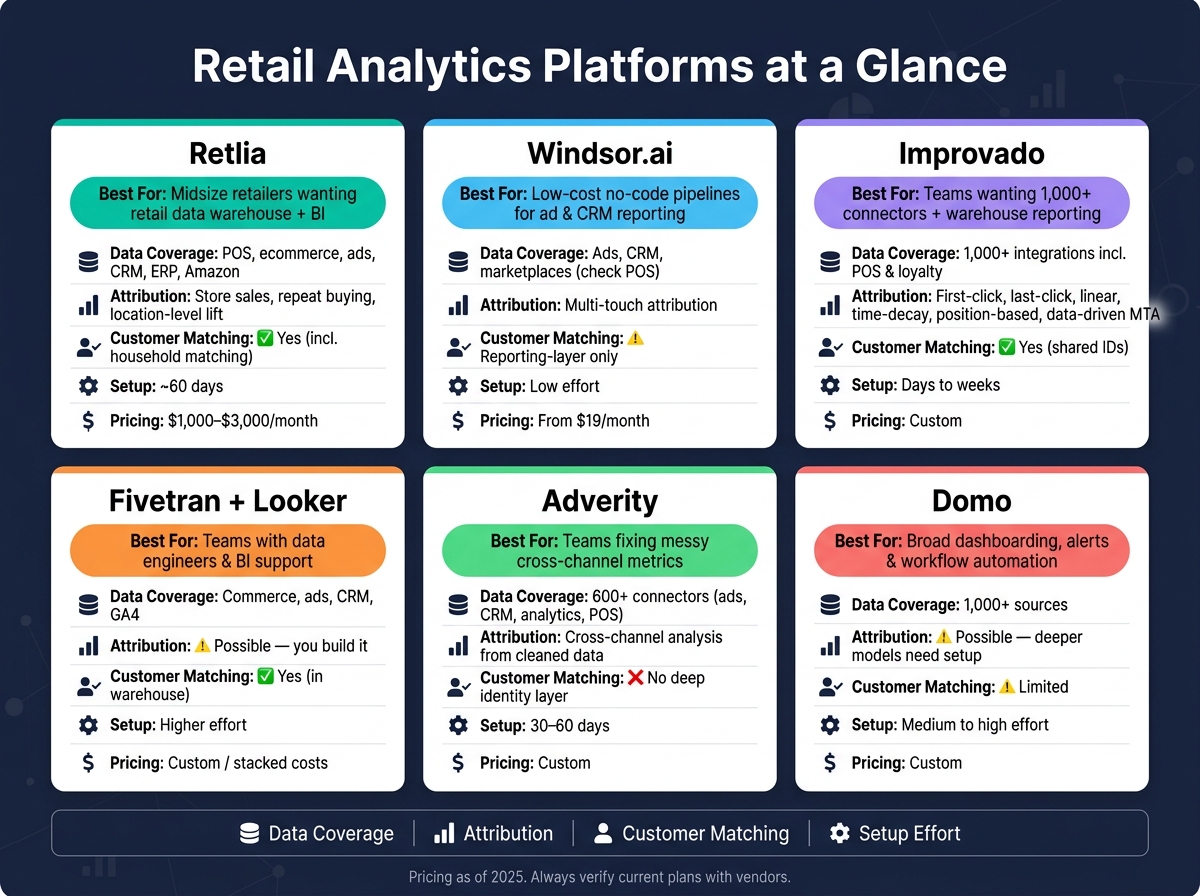
Retail Analytics Platforms Compared: Coverage, Attribution & Pricing
| Platform | Best for | Data coverage | Attribution | Customer matching | Setup effort | Pricing |
|---|---|---|---|---|---|---|
| Retlia | Midsize retailers that want a retail data warehouse plus BI | POS, ecommerce, ads, CRM, ERP, Amazon, wholesale, files, APIs | Store sales, repeat buying, location-level lift | Yes, including household matching | Lower effort; about 60 days | $1,000–$3,000/month |
| Windsor.ai | Low-cost no-code pipelines for ad and CRM reporting | Strong for ads, CRM, marketplaces; check POS support | Multi-touch attribution | Reporting-layer unification, but not deep retail identity matching | Low effort | From $19/month |
| Improvado | Teams that want many connectors and warehouse-based reporting | 1,000+ integrations, including POS and loyalty | First-click, last-click, linear, time-decay, position-based, data-driven MTA | Yes, based on shared IDs | Days to weeks | Custom |
| Fivetran + Looker | Teams with data engineers and BI support | Strong connector set across commerce, ads, CRM, GA4 | Possible, but you build it | Yes, in the warehouse | Higher effort | Custom / stacked costs |
| Adverity | Teams fixing messy cross-channel metrics | 600+ connectors across ads, CRM, analytics, POS | Cross-channel analysis from cleaned data | No deep customer identity layer | About 30 to 60 days | Custom |
| Domo | Broad dashboarding, alerts, and workflow automation | 1,000+ sources | Possible, but deeper retail models need setup | Limited in the article’s framing | Medium to high effort | Custom |
My takeaway: if you want one place for store sales, ads, and CRM without building a warehouse project from scratch, Retlia looks like the best fit for midsize retail teams. If you care more about low-cost data movement, warehouse control, or metric cleanup, one of the other options may fit better.
Below, I’d break down where each platform stands and where the tradeoffs show up.
1. Retlia

Retlia gives midsize commerce teams a retail data warehouse and BI layer for unified reporting across store sales, ads, and CRM. For that to work, the platform needs broad, dependable access to data across the business.
Data Coverage
Retlia connects to Shopify POS, Google Ads, Meta Ads, HubSpot, Salesforce, ERP, ecommerce, Amazon, and wholesale systems, along with APIs, databases, SSH, and flat files. That means teams can pull sales, marketing, and customer data into one place without building custom integrations from scratch.
Once those connections are in place, the next step is figuring out what all that data says about performance. That’s where attribution starts to matter.
Attribution Depth
Retlia ties in-store purchases, repeat buying, and location-level revenue lifts back to digital campaigns. So instead of guessing which channels drive repeat buyers, teams can see it in the data. The same goes for promotions: you can check whether a campaign lifted revenue in a specific store or within a certain segment.
Customer Unification
Retlia combines POS, ecommerce, ERP, and CRM records into a single customer profile using name-matching, near-match logic, and household matching. In plain English, if someone shops online and also buys in-store, they won’t end up split across duplicate customer records.
That unified customer view is useful on its own. But for most midsize retailers, speed matters just as much as data quality.
Deployment for Midsize Retailers
The base package is built to go live in 60 days. It includes 100 hours of data engineering, prebuilt connectors, Snowflake and Tableau licenses, custom dashboards, and 10 hours of monthly support for maintenance and schema updates.
Pricing runs about $1,000 to $3,000 per month. There’s also an AI chatbot add-on for natural-language queries, which gives teams a simpler way to ask questions without digging through dashboards. For midsize retailers, that mix of setup speed and hands-on support makes the platform practical day to day.
2. Windsor.ai
Windsor.ai is a no-code data pipeline platform built around a library of 350+ connectors. It pulls data from ad platforms, CRMs, and marketplaces, then sends that data where you need it. You can connect sources, route everything into BigQuery, and build reports in Looker Studio or Power BI without writing custom API scripts.
Data Coverage
The connector library includes Google Ads, Meta Ads, Amazon, and CRM systems. Windsor.ai handles schema mapping and scheduled refreshes for you, which cuts a lot of busywork. Its managed pipelines can remove more than 80% of custom scripting and manual maintenance.[1]
That said, its sweet spot is ad and CRM data. If your team also needs POS or store sales data, it’s smart to check support first instead of assuming full retail coverage.
Attribution Depth
Windsor.ai includes multi-touch attribution (MTA). That matters because MTA shows how ads help across the full customer journey, not just at the final click.
Why does that matter in practice? A channel that looks weak in a single-touch model can look much stronger once you see how it assisted earlier conversions. That can give teams a better read on ROI, especially across paid media.
Customer Unification
Windsor.ai does more than attribution. It also standardizes data for unified reporting, which makes cross-channel analysis much easier.
It centralizes and normalizes sales, ad, and CRM data into one reporting layer. From there, teams can track campaign performance, customer behavior, and revenue in one place instead of piecing together reports from separate systems.
Deployment for Midsize Retailers
Setup is fast. Pre-built dashboard templates for Looker Studio and Power BI help teams get up and running without a long build process. The platform also works with ChatGPT and Claude for natural-language queries, which can make day-to-day reporting feel a lot less technical.
Pricing starts at $19/month, so the entry cost stays low for midsize teams with limited IT resources.[1] If your team wants a pipeline-first setup and doesn’t want to spend weeks wiring data together, Windsor.ai keeps things light. The next platform goes deeper into retail analytics workflows.
3. Improvado
Improvado is a fit for teams that want more source coverage and deeper attribution. It adds warehouse-driven retail reporting and works as a retail analytics platform with 1,000+ pre-built integrations across ad networks, ecommerce platforms, CRMs, analytics tools, and offline sources like POS systems and loyalty programs.[11][2][14][15]
That broad connector library means teams can pull data from Shopify, Google Ads, Meta Ads, HubSpot, Salesforce, and GA4 without building custom API connections.
Data Coverage
Improvado standardizes ad, ecommerce, POS, loyalty, and CRM data into one format. In plain English, it helps teams look at data from different systems without stitching everything together by hand.
For retail teams, that matters a lot. They can see which campaigns lead to in-store sales instead of trying to piece the story together across separate tools.[4]
After the data is normalized, Improvado uses it for attribution and customer-level analysis.
Attribution and Customer Unification
Improvado supports these attribution models:
- first-click
- last-click
- linear
- time-decay
- position-based
- data-driven multi-touch attribution[9]
Its identity resolution layer connects touchpoints across ad platforms, ecommerce, CRM, and offline sources. It joins POS transactions, ecommerce orders, and CRM profiles using shared identifiers like email addresses, loyalty IDs, and CRM IDs. The goal is simple: tie campaign activity back to one customer profile.[13][4]
Once that profile is in place, teams can build segments such as high-LTV omnichannel customers or shoppers first acquired through paid social who later purchase in-store.[3][4][6][9] Those profiles then flow into the warehouse for reporting.
Deployment for Midsize Retailers
Improvado sends unified data into cloud data warehouses like Snowflake, BigQuery, or Redshift, where BI tools can plug in for reporting.[4][5][7][8] So if your team already works in a warehouse setup, this will feel familiar.
Implementation usually takes days to weeks.[4][8][10] One thing to know upfront: Improvado is warehouse-first, not a standalone reporting app. Pricing is custom and depends on data volume and source count. In most cases, it sits in the mid-market to enterprise price range.[12][10][16][17]
4. Fivetran + Looker
For teams that already like a warehouse-centered setup, this stack gives you more control, but it also asks more from your team. Fivetran + Looker is a warehouse-first stack that pulls store sales, ad spend, and CRM data into one reporting layer, then analyzes it in Looker.[22][24][19]
Data Coverage
Fivetran supports hundreds of prebuilt connectors across the sources most midsize retailers care about, including Shopify, Google Ads, Meta Ads, TikTok Ads, HubSpot, Salesforce, Google Analytics 4, and LinkedIn Ads.[18][23][27][19] That wide connector coverage means retailers can send sales, marketing, and customer data into one warehouse without custom API work. The payoff is simple: one place to compare store sales, ad results, and CRM segments.
Looker adds prebuilt Blocks for common retail use cases. The Shopify Block, for example, includes dashboards for orders, revenue, product performance, repeat customers, and abandoned carts.[28]
Attribution Depth
Attribution is possible here, but it takes more setup than a plug-and-play platform. Teams usually bring campaign and event data together in the warehouse, then build multi-touch models in Looker or custom LookML to connect store and online sales back to campaigns.[22][26][19]
That freedom is the big draw. You can shape attribution logic around how your business actually works. But there’s no getting around the trade-off: someone on your team has to build that logic and keep it running.
Customer Unification
Fivetran syncs CRM and commerce data from sources like Salesforce, HubSpot, and Shopify into the warehouse. From there, Looker’s modeling tools can join customer IDs, email addresses, and other matching fields into a customer 360 view.[18][22][23][28]
Teams can then segment customers by metrics such as total revenue in USD, average order value, acquisition channel, and email or ad touchpoints over time.[18][20][21] Looker also gives teams granular permissions over access. So marketing might see campaign-level performance and curated segments, while finance can access more detailed revenue data.[19]
Deployment for Midsize Retailers
This stack means managing Fivetran, a cloud warehouse, and Looker licensing, along with connector upkeep and model maintenance over time.[22][24][25][29] Initial setup usually includes:
- Configuring connectors
- Loading data into the warehouse
- Building or customizing Looker Blocks and Explores before the team gets usable dashboards[22][23][19][28]
For retailers with some analytics or BI skill in-house, that can be handled. For teams without that support, the learning curve and day-to-day maintenance are real factors to think through before moving ahead. For teams that want less warehouse work, the next platform moves more of the modeling and reporting into a managed layer.
5. Adverity
If your warehouse is already set up, Adverity gives you managed ingestion and metric harmonization without forcing you to swap out what you already have. Adverity Connect handles data ingestion and harmonization. Adverity Atlas sits on top of your warehouse as a marketing-focused layer. In practice, Adverity cleans up source data before it lands in the warehouse, so retailers can compare ad spend and revenue using one shared set of definitions.
Data Coverage
Adverity has 600+ actively managed connectors for Google Ads, Meta Ads, CRM platforms, analytics tools, and POS sources [30]. Its harmonization layer also maps mismatched field names before data reaches your warehouse. So if Google Ads uses "cost" and Meta uses "spend", Adverity treats them as the same metric [30].
Attribution Depth
Atlas connects to your current warehouse, including Snowflake, BigQuery, Redshift, Databricks, Azure Synapse, and others [30]. That means teams can run cross-channel analysis without rebuilding data models first. The payoff is simple: cross-channel ROAS calculations tend to be more dependable than in setups where each source uses different field definitions [30].
Metric Consistency
Adverity standardizes revenue, spend, and engagement definitions across sources, but it does not do customer-level identity matching. That’s an important line to draw. Adverity works best when the main issue is messy reporting across ad platforms, CRM systems, and POS data – not stitching together customer identities. Instead of arguing over which dashboard is right, teams can work from one consistent data base.
Deployment for Midsize Retailers
Adverity Connect is usually production-ready within 30 to 60 days [30]. Atlas can plug into an existing warehouse and start delivering insights within one session, with full production readiness possible in as little as one day [30]. On top of that, 92% of G2 reviewers give Adverity four stars or higher, and 44% point to support as a standout feature [30].
If your team wants a broader BI layer after standardizing data, the next platform takes more of an all-in-one route.
6. Domo
Domo brings store, ad, and CRM data into one governed workspace for retail analytics. That matters most when a retailer needs live reporting across sales, media, and customer data without building separate dashboards from scratch.
Data Coverage
Domo connects to 1,000+ sources and can centralize access to data that already lives in Snowflake, AWS, or Databricks [31]. Once those sources are in one place, Domo can turn data changes into alerts and actions.
Automation and Insights
Domo’s Workflows and Intelligent Automation can trigger alerts and actions as sales, spend, or inventory shifts [31]. Domo puts a lot of weight on governed data, which means the quality of the source data has a direct effect on the insights it produces [31].
Deployment for Midsize Retailers
Domo’s broad connector set can help midsize teams, but it often comes with more setup work. The big draw is simple: one version of retail data that teams can use without stitching reports together by hand.
As of July 2026, Domo holds a 4.5/5 rating on Gartner Peer Insights based on 560 reviews and a 4.3/5 rating on G2 based on 1,034 reviews [31]. Those scores point to solid third-party feedback as of July 2026.
Next, compare these platforms on connector coverage, attribution depth, customer unification, and implementation effort.
How These Platforms Compare on the Criteria That Matter
The decision comes down to four questions: coverage, attribution, customer unification, and deployment speed.
Use these four criteria to judge Retlia’s fit.
| Criterion | What matters | Retlia |
|---|---|---|
| Data coverage | POS, ecommerce, CRM, ERP, Amazon, and marketing data in one place | Brings POS, ecommerce, CRM, ERP, and marketing data into one warehouse. |
| Revenue tracking | Connect campaigns and promotions to revenue | Links campaigns and promotions to store revenue and KPI reporting. |
| Customer unification | A consistent view of the same customer across systems | Matches records across systems to build unified customer profiles, including household-level matches. |
| Deployment | Fast setup with low IT dependence | Provides a prebuilt warehouse, BI layer, and onboarding support for faster rollout. |
These four points are where the gap usually shows up. It’s one thing to collect data. It’s another to tie store sales, ad spend, and CRM activity back to revenue in a way teams can actually use.
Retlia stands out when store, ad, and CRM teams need one warehouse-backed view of revenue and customer behavior. It brings data from retail and marketing systems into a single warehouse, then cleans and organizes it so teams can report, segment, and analyze performance without heavy IT support.
That means less time pulling numbers from separate tools and more time working from the same set of facts.
Pros and Cons by Platform
This section helps split the field into three practical areas: setup speed, retail data coverage, and attribution depth.
| Platform | Main Advantage | Main Limitation |
|---|---|---|
| Retlia | Prebuilt retail data warehouse with unified store, ad, and CRM data; ships with onboarding support and low IT overhead | Best suited for midsize commerce businesses rather than large enterprise teams |
| Windsor.ai | Fast no-code setup for paid media attribution across online and offline conversions | Offline attribution is only as strong as the POS and CRM data you load |
| Improvado | Wide connector coverage across ad, ecommerce, POS, and CRM sources with standardized taxonomies | Custom KPIs and complex attribution require marketing ops and data specialists |
| Fivetran + Looker | Full control over data models and cross-channel reporting logic | Requires data engineers and BI analysts; not turnkey for midsize teams without in-house technical staff |
| Adverity | Strong data harmonization across many channels and data sources | Focused on marketing data quality rather than full retail operations; store-level metrics may need additional configuration |
| Domo | Broad connector set with low-code dashboard building for executive reporting | Deeper retail attribution and customer lifetime value models require significant upfront configuration; high switching costs |
The biggest split comes down to how much retail modeling each platform gives you out of the box.
Some tools get you moving fast. Others give you more control, but they also ask more from your team. That usually means more setup work, more data work, or both.
For example, Retlia leans toward teams that want a prebuilt retail data warehouse with store, ad, and CRM data already pulled together. Windsor.ai is more about quick no-code attribution, but the offline side depends on the quality of the POS and CRM data you bring in. Improvado, Adverity, and Domo sit in the middle in different ways: broad source coverage, dashboarding, and data cleanup are there, but deeper retail use cases often take added configuration.
Then you have Fivetran + Looker. That route gives your team a lot of control over data models and cross-channel reporting logic. But let’s be honest: it isn’t a plug-and-play option for midsize teams without in-house technical staff.
So the tradeoff is pretty simple. The more custom work your team can handle, the more flexible your setup can be. The less technical support you have, the more it helps to pick a platform that already understands retail data structure from day one.
Conclusion
After looking at coverage, attribution, and deployment effort, the choice mostly comes down to fit. What works best depends on your team’s goals and how much technical work your team can take on.
For midsize retailers, Retlia is the strongest fit. It comes with a prebuilt retail data warehouse and centers on the sources and workflows that midsize commerce teams use day to day. In plain terms, that means one warehouse-backed view of sales, media, and customer behavior without a heavy IT burden.
That leads to faster reporting, clearer attribution, and a single source of truth for store sales, ads, and CRM.
FAQs
How does customer matching work across store and online sales?
Customer matching brings store and online data together in layers so each shopper ends up with one dependable profile.
It usually starts with identity-based matching. In plain English, that means linking records with direct identifiers. Loyalty programs often do the heavy lifting here by using email addresses or phone numbers collected at checkout. Retailers may also match customers with hashed credit card numbers, login incentives, or persistent first-party cookies.
When those direct links aren’t there, the data warehouse moves to softer methods. That can include fuzzy matching and phonetic matching to connect records that look or sound alike. It can also fall back on approaches like matchback analysis and macro modeling to tie activity across channels when a one-to-one match isn’t possible.
What data sources should I connect first?
Start with your core sales and customer data. Connect your POS systems and ecommerce platforms first so you can pull in transactions, inventory, and online browsing behavior.
Then bring in your CRM and loyalty data, followed by your marketing and ad channels like Google, Meta, and email platforms. That gives you one data warehouse, which makes attribution and KPI reporting much easier to read.
How long does setup usually take?
Setup is built to move fast and usually takes 60 days.
That timeline includes 100 hours of hands-on data engineering to shape the retail data warehouse around your business. A proprietary schema and pre-built integrations for systems like Shopify, POS, and ERPs do most of the heavy lifting, so setup is handled for you.
The result: your team can start reporting and getting insights without leaning on internal IT or dealing with manual data upkeep.